

ZHDCOOKEY Fingerprint Biometric Slim Waterproof Smart Door Lock Aluminum RFID Card Password TTLock Electronic Sliding Door Locks


ZHDCOOKEY Fingerprint Biometric Slim Waterproof Smart Door Lock Aluminum RFID Card Password TTLock Electronic Sliding Door Locks
SPECIFICATIONS
Brand Name: ZhdCookey
Certification: CE,FCC,RoHS
Choice: yes
Connectivity: Bluetooth
Doorknob Funcition: Biometric
Fit Door Thickness: 30-70mm
High-concerned chemical: None
Material: Aluminium alloy
Model Number: YQ
Origin: Mainland China
Power Supply: DRY BATTERY
Protection Level: IP66
Smart home platform: Other,alexa,Google Assistant
Special Features: Support Gateway
Suitable Door Type: Steel Door,Wooden Door,Glass Door,Stainless Stell Door,Other
Ways To Unlock: App,Bluetooth,Mechanical Keys,CARD,Password,FINGERPRINT
ZHDCOOKEY Model: ZHD-A1
3. Passed waterproof testing, which can be installed outside door with eaves.
4. The lock is aluminum alloy, durable and corrosion resistance;
5. Five kinds unlock ways, fingerprint, password, IC cards, metal keys, Bluetooth App.
6. More mortise for choice, 2885, 3585, 4585, 6085 mortise, please choose the mortise which fit your door.
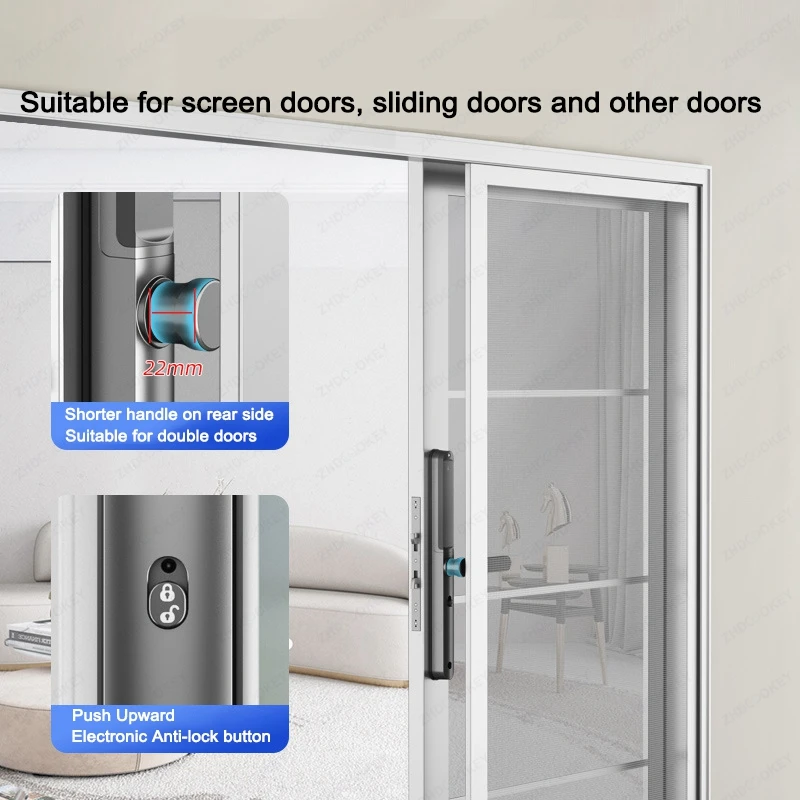
7. Best choice for slim door, Framed glass door, Aluminum door, KFC door, Broken bridge door, Sliding door.

Patermeters:
Fingerprint Capacity:100 Users
Password Capacity:50 Users
IC Card Capacity:100 Users max
Password length:6-12 numbers
Working Power:4pcs AA batteries(not include)
Power input:DC 4.4V-8V
Low power alarm: 4.8V
Standby current:<45uA
Operation current:<250mA
Working temperature:-20~65℃
Working humidity:15%~95%
Communication:Bluetooth
APP: TTlock
Waterproof: IP65
Emergency Power supply:1xMicro USB port
Suitable door thickness:about 30-70mm


Two Ways of Anti-lock, Double Security
1.Electronic Anti-lock button
2.Up to lift the handle Anti-lock
Note:If the door is locked, Only the administrator can access the door lock,
other users cannot unlock it from outside the door.


Smart Lock Structure:
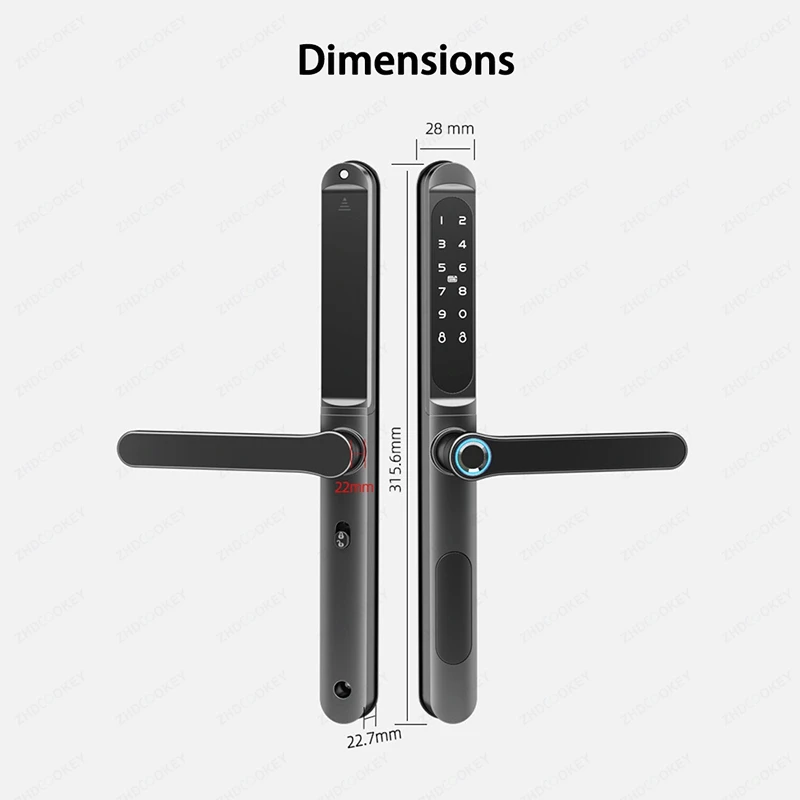
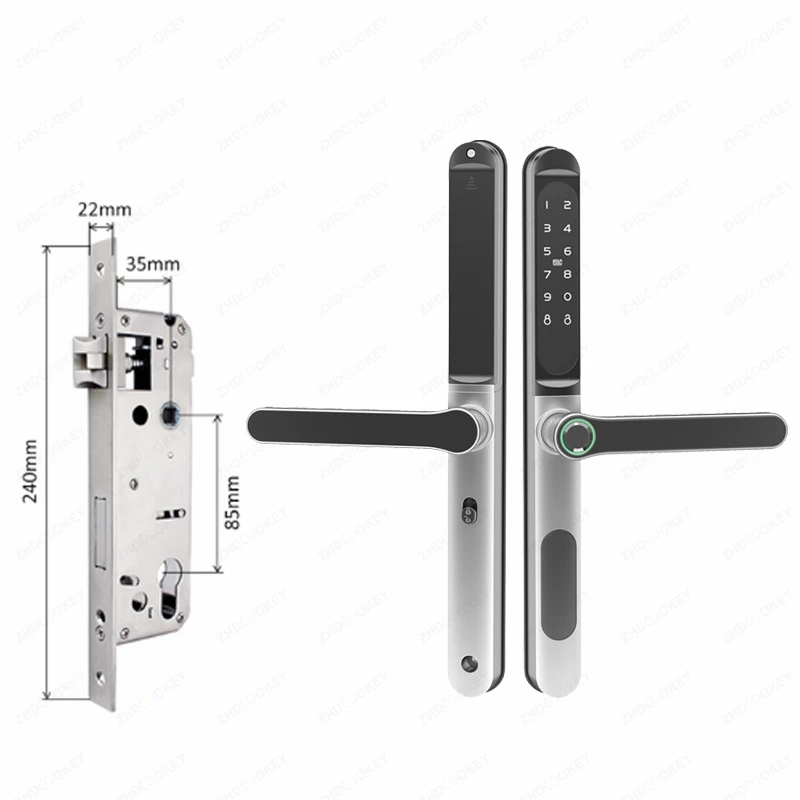
Mortise sizes for choice

TTLock App Functions:
1. Open lock by phone App remotely
2. Add fingerprint, password, IC card, ekey on phone app, no need operate on lock.
3.Send temporary password/ ekey unlock remotely
4. Save the unlock records
5.Connect to the lock by bluetooth


Click below picture to buy ttlock gateway.


Package include:
1x Front lock panel
1x Rear lock panel
2x Waterproof rubbers
1 x Lock mortise(Optional)
2 x RFID cards
2 x Mechanical keys
1 x User manual
1 x Screws kits
FAQ(Frequently Asked Questions):
Q1,How to add the device to TTLOCK APP?
A:Install the TTlock app on your smartphone, then turn on your phone's Bluetooth and light up the lock's screen. Add the device through TTlock app.
Please refer to the video at the link:https://video.aliexpress-media.com/seller/play/5000430338359.mp4
Q2:Why is my door lock in the normally open mode or the handle won't turn? How do I change the setting?
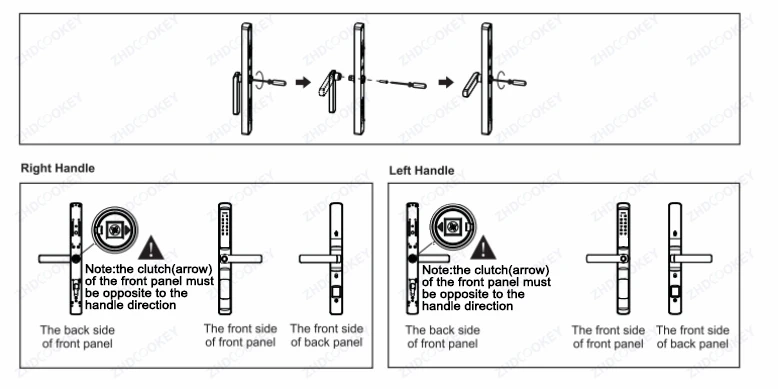
A:Reason:When the arrow direction behind the front panel is in the incorrect position, the door lock is in the normally open mode. When the arrow points upward or downward, the door lock handle cannot be turned.
Correct setup: The arrow direction must be opposite to the handle direction.
When facing the arrow, if your handle opens to the left, the arrow should point toward your left side.
If your handle opens to the right, the arrow should point toward your right side.
Please refer to the video at the link:https://video.aliexpress-media.com/seller/play/5000430338415.mp4
Q3,How to restore factory settings?
A:Longly press the Reset button for 5 seconds on the lock, hear "please enter the initialization password", enter 000#, the lock to restore factory setting, empty all the fingerprint, passwords, cards and administrators records.
Please refer to the video at the link:https://video.aliexpress-media.com/seller/play/5000430342298.mp4
Q4,How to add management fingerprint, IC card and password?
A:Please refer to the manual or the video at the link:https://video.aliexpress-media.com/seller/play/5000430338510.mp4
Q5,How to install the smart lock?
A:Please refer to the manual or the installation video above the product details.